Friday, April 14, 2017

Single Fiber Solutions for CWDM and DWDM Networks

It is well known that there are two transmission ways for fiber optical network, single fiber transmission and dual fiber transmission. From the name, it is easy to learn that the fiber amount is the main difference of these two transmission ways. For the dual fiber transmission, there should be totally two optical fibers, one for transmitting signals, and the other for receiving signals. But for the single fiber transmission, it only requires one optical fiber that can transmit and receive signals at the same time. This feature makes the network deployment easier and the network deployment cost lower than that of dual fiber one, especially in WDM network deployment. In this paper, it will mainly introduce the single fiber solution and its applications in CWDM and DWDM networks.

Single Fiber Solution
Single fiber solution can be also called bidirectional (BiDi) solution designed for carrying signals in both sides of one optical fiber simultaneously. When the single fiber network runs, the signals transmitted from the two sides feature different wavelengths to ensure the dual way transmission. Compared to the dual fiber network, the easy-to-deploy single fiber network would be a good choice for those who have limited budgets but need for bigger network capacity. As for its application, it is very popularly used in Point to Point, Ring or linear Add and Drop, where installing new fibers is impracticable or uneconomical. It can be also used for promoting the reliability of an existing dual fiber network, in which there are one optical fiber for work and the other one for protection.

Single Fiber CWDM Network
The single fiber CWDM network enables the signals with different wavelengths to be transmitted through a signal fiber, which results in a network capacity boost in metro and access networks. As each signal beam can be carried via different channel independently, the different data rates and protocols (T1, T3, Ethernet, Serial, etc) can be transmitted for the different users or applications. To better know how does the single fiber CWDM network work, here offers a figure that shows a 8 channel single fiber CWDM network design.
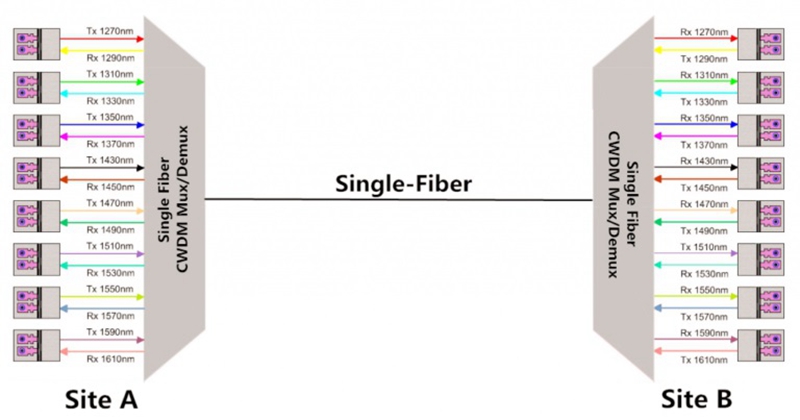
CWDM single fiber solution

From the figure, we can learn there are two 8 channel CWDM Mux Demux connected by a single fiber for transmitting 16 signals with different wavelengths and the 16 wavelengths are divided into 8 pairs for bidirectional transmission. On the site A, 8 wavelengths are used for transmitting signals and others for receiving signals. While on the site B, the wavelengths for the TX and RX on the CWDM Mux Demux are all reversed to ensure the performance of the single fiber CWDM network. For instance, the 1270 nm on the site A is the first transmitting wavelength but the first receiving wavelength on the site B. As a result, the signal with 1270 nm can be totally transmitted from site A to site B via the single fiber.

Single Fiber DWDM Network
The single fiber DWDM network also takes full use of the wavelength division multiplexing technology that can greatly expand the capacity over the existing optical network, especially for the long transmission network. Compared to the CWDM one, it can be designed with more channels for larger data signals and can support the network with a much longer distance. What’s more, if the transmission distance is too long, the optical amplifier can be used to enhance the signals. On the other hand, all these advantage makes the cost to deploy a single fiber DWDM network much higher than the CWDM one. Besides, here offers the figure of a single fiber DWDM network design for your reference.
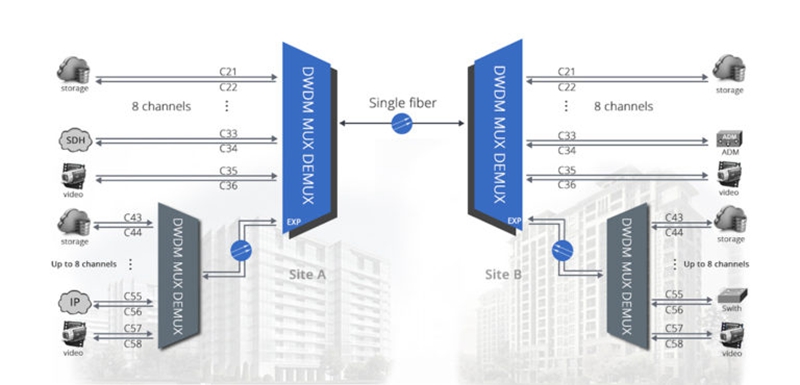
DWDM single fiber solution

The figure shows a complicated a single fiber DWDM network design that uses two 8 channel DWDM Mux Demux in the main link for single fiber transmission. As for the wavelength feature of the TX and RX for the ports on the DWDM Mux Demux, it is similar to the CWDM one, but the channel spacing is denser. What’s more, except for the existing channels in the main single fiber DWDM link, there can be more channels added into the expansion port of the link for carrying larger data signals. In short, although the cost for deploying single fiber DWDM network is so expensive, it is still a good solution that can make full use of the fiber link to transmit more signals at a much longer distance.

Conclusion
Undoubtedly, the single fiber WDM solution is an ideal choice for those who have limited budgets but need for bigger network capacity. As there are two single fiber WDM solutions available, which one to choose just depends on the network need and budget. The single fiber CWDM network would be more economical but can not transmit as much signals as the DWDM one can, while the DWDM is highly recommended for large and long transmission that would cost more.

Tuesday, April 11, 2017

How to Deploy a Single-Fiber CWDM Network?

Generally, CWDM network designed for expanding the network capacity can be basically divided into two types, dual-fiber and single-fiber CWDM network, according to the optical fiber transmission line. For the dual-fiber CWDM network, its working principle is easy to acquire, which uses the same wavelength for transmitting and receiving each pair of dual-way signals over the duplex fiber cable. However, for the single-fiber CWDM network, the working principle is highly complex that specially works with different wavelengths for transmitting and receiving each pair of dual-way signals over only one fiber. To better understand the single-fiber CWDM network, here will mainly illustrate how does a single-fiber CWDM network work and introduce the components and installation steps for fast deploying a single-fiber CWDM network.

Introduction of Single-Fiber CWDM Network

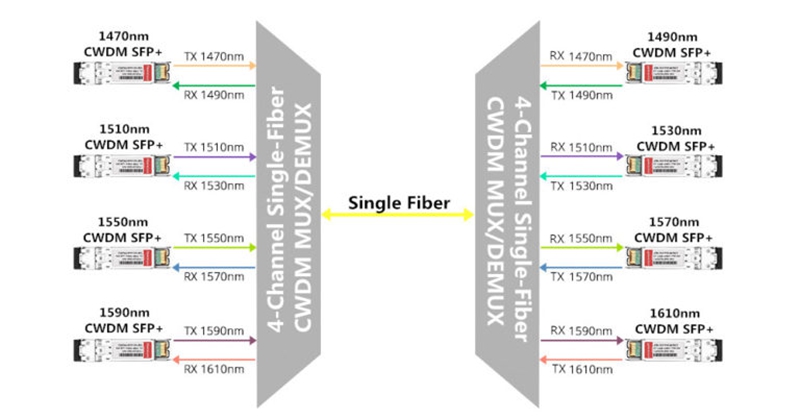
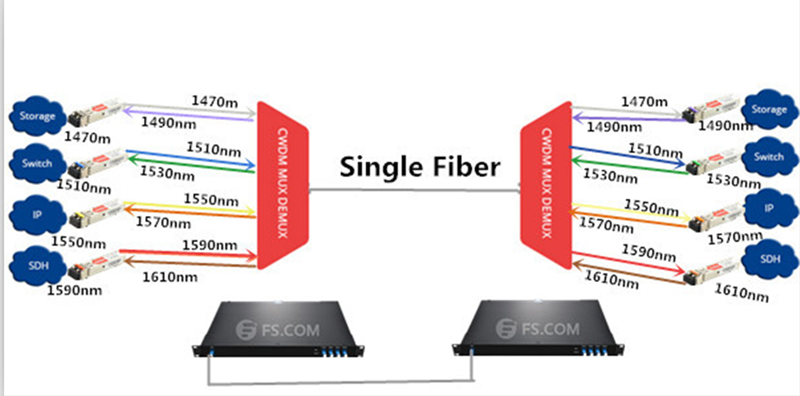
Single-fiber CWDM network is a kind of WDM network, designed for greatly expanding the network capacity by combining and transmitting several pairs of dual-way signals with different wavelengths over a single fiber, instead of putting more fibers for lager dual-way data transmission need. When the single-fiber CWDM network runs, there are two single-fiber CWDM Mux Demux using two different wavelengths for each pair of dual-way transmission. In details, if the single-fiber CWDM Mux Demux has four channels for dual-way data transmission, then eight different wavelengths divided into four pairs are required for the four channels, as shown in the figure below. To make a comparison, a 4 channel dual-fiber CWDM Mux Demux only needs four different wavelengths for the dual-way transmission.

 4 Channel CWDM Network

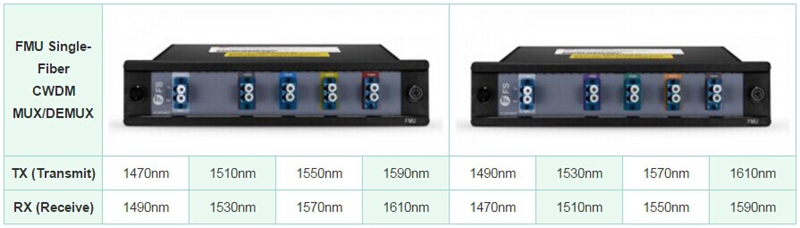
From the figure above, we can learn that a 4 channel CWDM network needs two reliable 4 channel CWDM Mux Demux connected by a single fiber and four pairs of CWDM transceivers with eight different wavelengths connected to the CWDM Mux Demux, achieving the dual-way transmission. Obviously, each pair of CWDM transceivers have the complete reversed TX and RX. Just taking the first pair of transceivers as example, the first transceiver on the left side uses 1470nm for TX and 1490nm for RX, while the first transceiver on the right side uses 1490nm for TX and 1470nm for RX, reversely. Meanwhile, to ensure the whole dual-way transmission, the ports of the two CWDM Mux Demux should feature the same TX and RX as those of transceivers. Hence, each pair of dual-way signals with two different wavelengths will be smoothly transmitted and received. To better understand how does the single fiber CWDM network work, the following table also lists the four pairs of wavelengths for the TX and RX ports of the two CWDM Mux Demux, which are also totally reversed.

TX and RX for Single-Fiber CWDM Mux Demux

Basic Components for a Single-Fiber CWDM Network

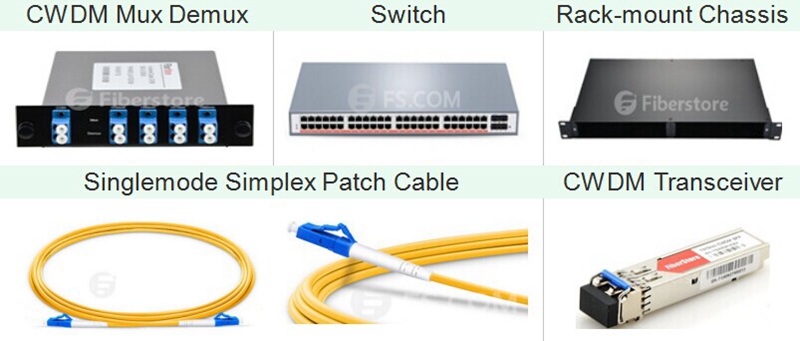
When deploy the single-fiber CWDM network, we should prepare two single-fiber CWDM Mux Demux, two switches, a rack-mount chassis, several pairs of CWDM transceivers and singlemode simplex patch cables that are the basic and essential components for a single-fiber CWDM network. The two switches separately act as the Local unit and Remote unit for the CWDM network, while the CWDM Mux Demux is the main unit of the network that should be fixed and held on the rack-mount chassis and then connected to the switch. To finish the connection between the CWDM Mux Demux and switch, we should insert the CWDM transceivers into the ports of CWDM Mux Demux and use the singlemode simplex patch cables to connect CWDM transceivers with the switch.

Basic Components for a Single-Fiber CWDM Network

Steps for Single-Fiber CWDM Network Deployment
To fast deploy a single-fiber CWDM network, here offers the step by step installation procedure.

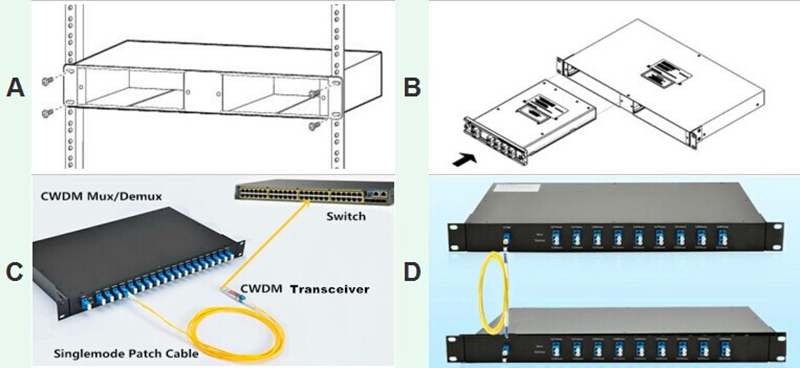
Step A: Install the rack-mount chassis in a standard 19-inch cabinet or rack.

Step B: Align the single-fiber CWDM Mux Demux with the chassis shelf, slightly push it to the shelf cavity. And tighten the captive screws once the CWDM Mux Demux is totally inserted.

Step C: Plug the CWDM transceivers into the switch. And also, connect these CWDM transceivers to the corresponding ports on CWDM Mux Demux according to the wavelengths of the TX and RX, with the use of singlemode simplex patch cable.

Step D: Utilize the singlemode simplex patch cable to connect the two CWDM Mux Demux and test the performance of the whole single-fiber CWDM network.

Installation Steps for Single-Fiber CWDM Network

Conclusion

Single-fiber CWDM network is a cost-effective and easy-to-deploy solution that can not only take full use of the available fiber bandwidth in your network but also greatly expand your network capacity. If you are hesitating over upgrading your system for bigger capacity, buy CWDM multi-channel Mux/Demux, CWDM transceivers and other basic components to deploy the single-fiber CWDM network would be a better choice for you.

Saturday, April 8, 2017

Single Fiber CWDM Network Overview

When designing the fiber optical network, we used to choose the duplex fiber cable as the first choice to finish the dual-way transmission, which transmits the dual-way signals via two separate simplex cables from the opposite sides. However, in some typical dual-way applications like working with BiDi fiber optic transceiver, the simplex fiber cable is required to transmit the dual-way signals respectively over only one fiber cable by using two different wavelengths that has a more complicated working principle than the duplex one. If we want to deploy a single fiber CWDM network, the basic principle is similar to simplex fiber cable but would be much more complicated, which will be explained detailedly in this post.

What Is the Single Fiber CWDM Network?

Single fiber CWDM network is a special kind of WDM network that can greatly increase the network capacity by combining and transmitting several pairs of signals with different wavelengths over a single fiber, with the aim of supporting several dual-way connections at the same time. To deploy the single fiber CWDM network, a pair of single fiber CWDM multi-channel Mux/Demux and several pairs of CWDM transceivers are needed. When the single fiber CWDM network works, the two single fiber Mux Demux require different wavelengths for each pair of dual-way transmission, which is very different from the dual fiber Mux Demux using the same wavelength for a pair of dual-way transmission. That’s to say, there are only four different wavelengths used for 4-channel dual fiber CWDM Mux Demux, but eight different wavelengths divided into four pairs for 4-channel single fiber CWDM Mux Demux.

How Does the Single Fiber CWDM Network Work?

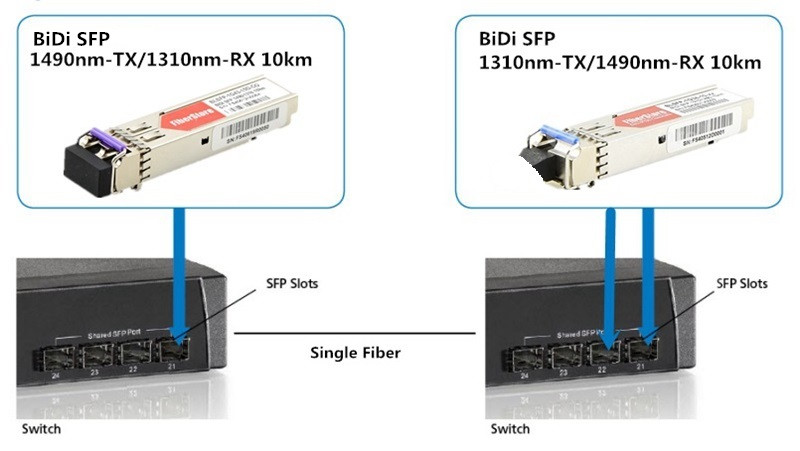
Before talking about the single fiber CWDM network, let’s take a simple BiDi network as an example first. In the BiDi network, only one simplex fiber cable and a pair of BiDi fiber optic transceivers are required to finish the dual-way connection. In details, the two BiDi fiber optic transceivers should be almost the same but has reversed wavelengths for TX and RX. For instance, if one transceiver with 1490nm for TX and 1310nm for RX is installed in one end of the fiber link, the other one in the opposite end should use 1310nm for TX and 1490nm for RX, as shown in the following figure. Hence, the dual-way signals with two different wavelengths can be transmitted over only one fiber cable.

Dual-way Transmission with BiDi Transceiver and Simplex Fiber Cable

As for the single fiber CWDM network, its basic principle is similar to the BiDi network but would be much more complicated, which can be also learned from the following figure. In the figure, there are two 4-channel single fiber CWDM Mux Demux connected to each ends of the single fiber, and four pairs of CWDM SFP+ transceivers designed with eight different wavelengths, totally achieving the 4-channel single fiber CWDM network. It is easily to learn that these eight different wavelengths are divide into four pairs and each pair has the complete reversed TX and RX. For instance, the first pair of CWDM transceivers consist of a transceiver with 1490nm for TX and 1310nm for RX in the left side and a transceiver with 1490nm for TX and 1310nm for RX in the right side, thereby a pair of dual-way signals with two different wavelengths will be transmitted through the first channel. To better understand how does the single fiber CWDM network work, the following table lists the eight ports with four pairs of wavelengths for TX and RX that are all reversed to ensure the dual-way transmission.

Single Fiber-CWDM Network
Four Pairs of Wavelengths for TX and RX

Conclusion

The single fiber CWDM network can greatly increase the network capacity for transmitting larger dual-way data signals, which is able to combine several pairs of signals with different wavelengths into an integrated signal and carry it through a single fiber. To build a smooth single fiber CWDM network, you should firstly install the CWDM fiber optic transceivers into two switches and then connect them into the channel ports of the two single fiber CWDM Mux Demux, finally use a single-mode simplex fiber cable to link the two CWDM Mux Demux together. Besides, to ensure the performance of the single fiber CWDM network, there are some important factors like light loss, transmission distance, and optical signal dropping and adding should also be taken into consideration.

Wednesday, April 5, 2017

10G DWDM Network for Economically Expanding Capacity

It can’t be denied that for most users, the capacity and transmission data rate their 10G networks offer sufficiently meet their needs at present. However, for some users, their 10G networks are capacity-hungry that requires more and more fiber optical cables installed for carrying large data. Considering that the available fiber infrastructure is limited, the method of putting more cables would be infeasible or unsuitable once the infrastructure no longer fulfill the growing requirements. Is there any economical solution to solve this issue, except upgrading the network that would cost a lot? The answer is yes. In order to create new capacity at a relatively low price, WDM technology is come up with that enables virtual fibers to carry more data. Since WDM technology has been a cost effective solution to face the capacity-hungry issue, here will offer the economical DWDM SFP+ transceiver and DWDM Mux Demux solutions for you to build the 10G DWDM network, which enables bigger capacity to meet your network needs.

DWDM SFP+ Transceiver

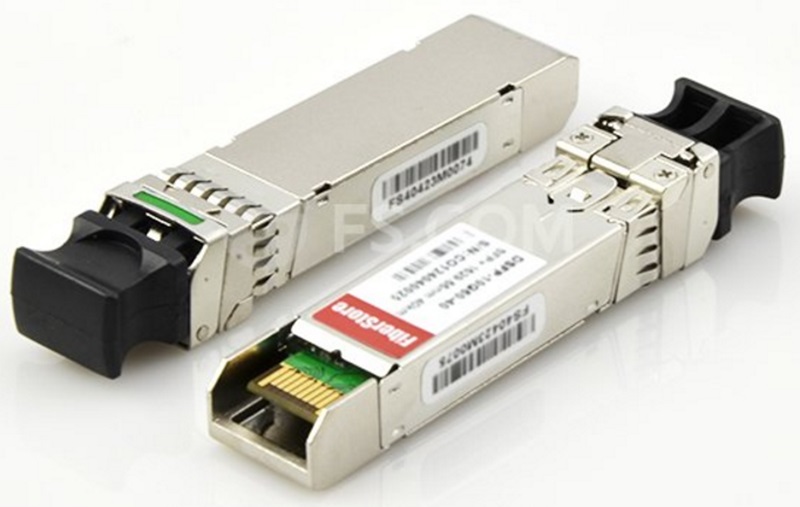
The DWDM SFP+ transceiver is an enhanced version of DWDM SFP transceiver that can transmit signals at 10Gbps–the max data rate, mostly deployed in the dark fiber project in combination with the DWDM Mux Demux. Like other kinds of SFP+ transceivers, it is also compliant to the SFP+ MSA (multi-source agreement), designed for building 10G Ethernet network. However, the working principle of DWDM SFP+ transceiver is much more complicated than that of common SFP+ transceiver due to the DWDM technology.

DWDM SFP+ transceiver

Generally, the DWDM SFP+ transceiver has a specific tuned laser offering various wavelengths with pre-defined “colors” which are defined in the DWDM ITU grid. The colors of the wavelengths are named in channels and the wavelengths are around 1550nm. Its channels are commonly from 17 to 61 and the spacing between channels is always about 0.8nm. In fiber optical network, the 100GHz C-Band with 0.8nm DWDM SFP+ transceiver is the most commonly used one, while transceivers with other spectrum bands like 50GHz with 0.4nm spacing DWDM SFP+ transceiver are also popular with users.

According to the transmission distance, the DWDM SFP+ transceiver can be divided into two types. One is the DWDM-SFP10G-40 with an optical power budget of 15dB, and the other is the DWDM-SFP10G-80 with an optical power budget of 23dB. As we know, the bigger the optical power budget is, the longer the transceiver will support the 10G network. Hence, the DWDM-SFP10G-40 can transmit 10G signals at lengths up to 40 km, but the DWDM-SFP10G-80 is able to support the same network with a longer distance, 80 km. What should be paid attention to is that the transmission distance can be also affected by the quality and type of the DWDM Mux Demux, the quality and length of the fiber, and other factors.

DWDM Mux Demux

The DWDM Mux Demux is a commonly used type of fiber optical multiplexer designed for creating virtual fibers to carry larger data, which consists of a multiplexer on one end for combining the optical signals with different wavelengths into an integrated signal and a de-multiplexer on the other end for separating the integrated signal into several ones. During its working process, it carries the integrated optical signals together on a single fiber, which means the capacity is expanded to some extent. In most applications, the electricity is not required in its working process because the DWDM Mux Demux are passive.

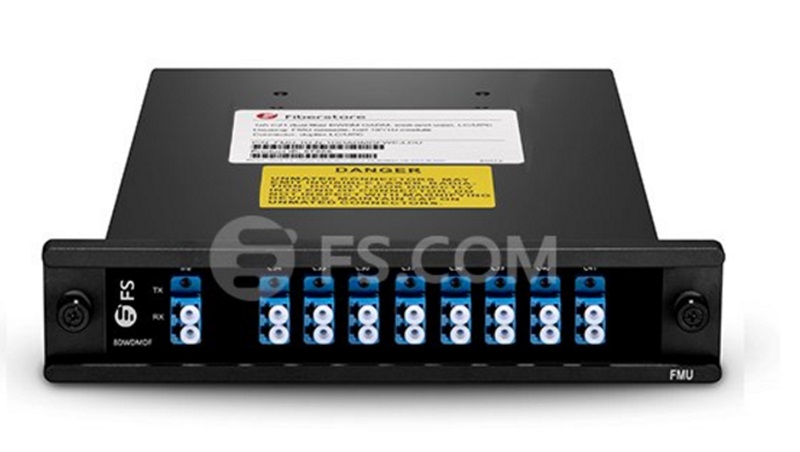
Unlike the CWDM Mux Demux with 20nm channel spacing, the DWDM Mux Demux has a denser channel spacing, usually 0.8nm, working from the 1530 to 1570nm band. It is designed for long transmission, which is more expensive than CWDM Mux Demux used for short transmission. Meanwhile, it also commonly used the 100 GHz C-band DWDM technique like the DWDM transceiver. As for its classification, there are basically two types according to line type, dual fiber and single fiber DWDM Mux Demux, and six types according to the number of the channels, 4, 8, 16, 40, 44 and 96 channels DWDM Mux Demux. All these types of DWDM Mux Demux are available at FS.COM with ideal prices. To better understand the DWDM Mux Demux, here offers a figure of a stable 8 channel DWDM Mux Demux for your reference.

8 channel DWDM Mux Demux

Conclusion

Taking the cost issue into consideration, deploying a 10G DWDM network is much more economical than upgrading your network from 10G to 40G/100G which almost requires changing out all the electronics in your network. The 10G DWDM network makes full use of DWDM technology to expand the network capacity, which creates virtual fibers to support more data signals. If your 10G network is also capacity-hungry, you are highly suggested to deploy 10G DWDM network to make new capacity. As for the related components the 10G DWDM network needs like transceiver and Mux Demux, you can easily find them at FS.COM. For instance, FS.COM offers the DWDM SFP+ transceivers compatible with almost every brand, including Cisco, Juniper, Brocade, Huawei, Arista, HP and Dell, which have been tested to assure 100% compatibility.

Originally source:
http://www.chinacablesbuy.com/10g-dwdm-network-for-economically-expanding-capacity.html

Thursday, March 30, 2017

The Most Economical QSFP28 AOC and Switch Solution for 100G Network

Nowadays, most users choose to deploy 10G and 40G network that perform highly and efficiently in their systems. It cannot be denied that the bandwidth and capacity the 10G and 40G network provide are enough for their needs at present. However, due to the fast developing Ethernet network technology, the scale and traffic of Internet is rapidly expanding that will make the 10G and 40G network gradually obsolete and unsuitable for data centers, especially for the large-scale ones. Along with this trend, there is no doubt that the 100G network will become the mainstream in the near future. Are you now ready for the 100G network? Or still hesitating because of the high cost? In this paper, it will introduce some 100G QSFP28 AOC and switch solutions that can help you seek the most economical one to upgrade your system from 10G/40G to 100G.

100G QSFP28 AOC and Switch Solution

100G QSFP28 AOC Solutions

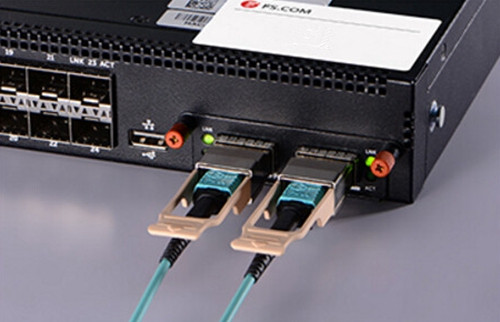
QSFP28 AOC is a cost effective cable solution for 100G short distance transmission that consists of an OM4 multimode cable and two QSFP28 connectors, supporting 100G QSFP28 standards and compliant to the QSFP MSA (multi-source agreement). The length of the cable is usually available from 1 to 30 meters and its two QSFP28 connectors are fitted at each end of the OM4 multimode cable, very convenient for inserting into and removing from 100G QSFP28 ports. In data center, the QSFP28 AOC is really a low power alternative for 100G short distance transmission, which is highly recommended for the simplified intra rack and inter rack configurations. To seek the most economical QSFP28 AOC solution, the figure below shows the prices of several famous brands of QSFP28 AOC for your reference.

100G QSFP28 AOC Price Comparison

100G Switch Solutions

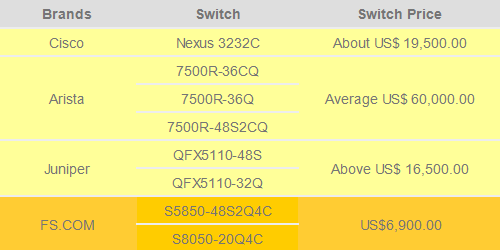
100G switch is an improved kind of network device designed for data center that offers the signal lane for any two 100G network nodes inserted into its ports. With the popularity of 100G network, it can be also available on many famous fiber optic manufactures like Cisco, Arista, Juniper, as well as the fiber optic manufacture FS.COM. With the aim of looking for a more economical 100G switch solution, the following will mainly introduce Cisco Nexus 3232C, Arista 7500R, Juniper QFX5110 and FS.COM S5850-48S2Q4C, both of which are fitted with QSFP28 ports to support QSFP28 AOCs.

The first type of switch–Cisco Nexus 3232C is a typical kind of low latency and high-performance 100G switch that can not only fulfill our current network needs but also suit for future applications such as big data, cloud and virtualization. And all its 100G QSFP28 ports can operate at 10, 25, 40, 50 and 100 GbE. The second type–Arista 7500R switch, including 7500R-36CQ, 7500R-36Q and 7500R-48S2CQ, is designed to lower power per 100GbE port and produce more reliable and dense network, which are available in a compact system design of 12, 8 and 4 slot. The third type–Juniper QFX5110 can be simply divided into QFX5110-48S and QFX5110-32Q, both of which have 100G QSFP28 ports to support QSFP28 AOC. All these three kinds of 100G switches are very expensive which can be learned from the following figure.

100G Switches Price Comparison

Compared to the previous three types, 100G switches like S5850-48S2Q4C and S5850-20Q4C provided by FS.COM can be available at a much lower cost. In details, the S5850-48S2Q4C has 48x10GbE SFP+ ports, 2x40GbE QSFP+ ports and 4x100GbE QSFP28 ports, while the S8050-20Q4C has 2x40GbE QSFP+ ports and 4x100GbE QSFP28 ports. Both of them are the cost effective switch solutions for building 100G network.

Discussion and Conclusion

From the text above, it can be easily learned that using Arista QSFP28 AOC and switch to deploy the 100G network would cost the most that can be as high as US$ 63,000.00, while the QSFP28 AOC and switch solution provided by FS.COM would be the most economical one, available at a quite low cost usually from US$ 7,440.00 to US$ 7,530.00. Considering that, you are recommendable to use the FS.COM QSFP28 AOC and switch solution for building your 100G network. If you have already had the switch like Cisco, Arista or Juniper, you are also suggested to choose FS.COM compatible QSFP28 AOC that has been tested to assure 100% compatibility, as a much more cost-effective cable solution.

Wednesday, March 29, 2017

Things You Should Know to Deploy 100G Ethernet Network

Although the 10G and 40G Ethernet network still occupy the majority of fiber market at present, it is predicted that more and more users would deploy 100G Ethernet network in the following years for higher capacity and faster transmission data rate, and the 100G cabling network would finally make the 10G and 40G cabling network obsolete. Is there any evidence to support this prediction? Why to replace 10G and 40G cabling network and how to deploy the 100G cabling network? Does this statement take the cost issue into consideration since the 100G products like QSFP28 transceiver and QSFP28 breakout cable are much more expensive than the 10G and 40G products? Let’s talk about these topics and find the most cost effective way to deploy the 100G cabling network.

Why We Deploy 100G Cabling Network?

With the fast development of fiber technology, the capacity and transmission data rate that the 10G and 40G networks offer gradually can’t meet our needs and the Ethernet network is still driven to satisfy the increasing requirements of faster and easier access to larger volumes of data. Under this trend, the 100G network is come up with that enables unsurpassed bandwidth but can be only available at a high price. As the 100G technology is gradually matured, the cost for 100G network deployment is reduced a lot. Hence, more and more users would like to deploy the 100G network for bigger bandwidth, even it would still cost higher than 10G and 40G network deployment.

Which Transceiver Is the Best for Deploying 100G Network?

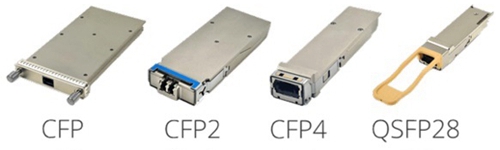
Before designing the 100G cabling network, we should choose the most proper 100G fiber transceiver to greatly ensure the performance of the network. Since there are four common kinds of 100G fiber transceivers–CFP, CFP2, CFP4 and QSFP28 transceiver available on the market, let’s study the basic knowledge of these 100G transceivers and discuss which one is the best choice for the 100G network deployment.

CFP transceiver is the first version of 100G transceiver which is published after the establishment of certification for the first 100G standard for Ethernet networks. The letter “C” means 100G, while the letters “FP” stand for Form factor Pluggable, just like the “FP” in the word SFP. In order to support the 100G network, it features very huge size which is much larger than 40G QSFP+ transceiver. Meanwhile, most of the CFP transceivers double the power consumption per bit and are ten times more expensive for per bit increased. All these shortcomings hinder the popularity of CFP transceiver and make the CFP2 and CFP4 transceiver published successively.

The CFP2 and CFP4 transceiver has no any improvement in the aspects like density, power consumption and cost, but be only advanced in the size aspect. From the following figure, you can learn that the size of the CFP family become more and more smaller. However, due to the high power consumption and cost, using CFP family to deploy 100G network still can’t meet the network requirement. Under this condition, experts put forward the QSFP28 transceiver solution which is much smaller and more economic than CFP family.

CFP-CFP2-CFP4-QSFP28

In contrast to the CFP family, QSFP28 transceiver is a better choice that offers four 25-Gbps lanes, totally achieving the whole 100G network. With use of this kind of 100G transceiver, the 100G network can be deployed as easy as the 10G and 40G network. Moreover, it completely eliminates the costly gearbox found in CFP and CFP2, while highly increasing density and decreasing power and price per bit. Hence, among all the 100G transceivers, the QSFP28 transceiver is the first choice for deploying 100G network, which should be considered as the most economical transceiver solution.

Which 100G Cabling Solution Should Be Selected?

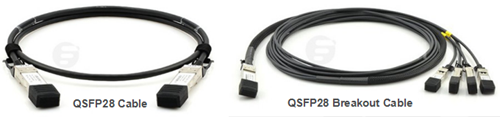
After choosing the best 100G transceiver solution, it is also necessary to design the 100G cabling network. At present, there are basically two 100G cabling solutions. One is the direct cabling solution usually working with the QSFP28 cable, and the other is the breakout cabling solution that always uses the QSFP28 breakout cable. Considering that each solution has its own connection method and works with different fiber or copper cable, which one should be selected depends on the practical application.

QSFP28 Cable for 100G Direct Cabling and QSFP28 Breakout Cable for 100G Breakout Cabling

As for the 100G direct cabling solution, it always uses the 100GBase-SR4 QSFP28 transceiver to finish short distance transmission, and 100GBASE-LR4 QSFP28 transceiver for long transmission. In short transmission case, the 100GBase-SR4 QSFP28 transceiver can support the 100G network through OM3 12 fiber multimode MTP cable at lengths up to 70 m, and 100 m through OM4 12 fiber multimode MTP cable. It can also work with the 100G QSFP28 to QSFP28 passive direct attach cable (DAC) for up to 5m transmission and with the 100G QSFP28 to QSFP28 active direct attach cable (AOC) for up to 10m transmission. While in the long transmission case, 100GBASE-LR4 QSFP28 transceiver enables the 100G network up to 10 km on single-mode LC patch cable. If much longer transmission distance is required, you are highly suggested to choose the 100GBASE-ER4 CFP transceiver that can transmit the 100G signal at lengths up to 40 km.

As for the breakout cabling solution, the connection method is very different from the previous one, which usually use the QSFP28 breakout cable to connect one QSFP28 transceiver on one side and four SFP28 transceivers on the opposite side. This kind of 100G cabling solution enables higher port bandwidth, density and configurability at a low cost and reduces power consumption in data centers. Besides, the QSFP28 breakout cables used for 100G breakout cabling can be simply divided into two types, QSFP28 to 4SFP28 DACs and AOCs. Both of the two kinds of QSFP28 breakout cables feature four individual 25G duplex cables to achieve 100G connections, similar to the 40G QSFP+ breakout cable that has four individual 10G duplex cables.

Conclusion

With the gradual mature of 100G Ethernet technology, the cost issue is not the obstacle for the popularization of 100G Ethernet network any more. If your network has a very low transmission speed and the capacity it offers can’t face your need, then you are recommendable to upgrade your network from 10G/40G to 100G, for faster and easier access to larger volumes of data. As for the transceiver used for 100G connection, the QSFP28 is the fist choice as the most cost effective solution at present. As for the 100G network cabling, the direct cabling for 100G to 100G connection and the breakout cabling for 100G to 4×25G connection are good solutions for 100G network deployment. Which one should be selected just depends on the practical application.

Originally source: http://www.chinacablesbuy.com

Tuesday, March 14, 2017

Third-party Transceiver Solutions for Ubiquiti Switches

As we all know, Ubiquiti is a famous company that provides various kinds of switches, including Edge Switch, Edge Router, UniFi Switch. What does attract more attention is, this company firstly published its own SFP and SFP+ fiber optic transceiver, compatible with its switches last year. Meanwhile, it also published that third-party fiber transceivers from some fiber optic transceiver manufacturers like Cisco, Brocade and FS.COM are compatible with the Ubiquiti switches, too. In this paper, it will mainly talk about which kinds of third-party fiber transceivers can support the Ubiquiti switches and which fiber optic transceiver manufacturers can offer the most reliable third-party fiber transceivers.
Transceiver Solutions for Ubiquiti Switches
Ubiquiti mainly provides switches for 1G and 10G Ethernet network. Until last year, they began to offer a small amount of single mode and multimode fiber transceivers to support the Ubiquiti switches. For instance, the UF-MM-1G and UF-SM-1G-S 1000Base SFP transceivers are used for the SFP ports on the Ubiquiti switches, while the UF-MM-10G, UF-SM-10G and UF-SM-10G-S 10GBase SFP+ transceivers are designed for connecting the SFP+ ports on the Ubiquiti switches.
Apart from their own fiber transceivers, there are also some other branded fiber transceivers tested on the Ubiquiti switches and confirmed to be compatible with Ubiquiti switches, such as Cisco, Brocade, Dell, HP, Finisar branded fiber transceivers. Just taking Cisco, the world famous fiber optic transceiver manufacturer as an example, it offers six kinds of SFP transceivers to support the Ubiquiti switches, Cisco GLC-LH-SM 30-1299-01 SFP, Cisco GLC-SX-MM, Cisco GLC-SX-MM 1000BASE-SX SFP, Cisco SFP-H10GB-CU1M, Cisco MGBSX1 Gigabit SX Mini-GBIC SFP Transceiver and Cisco GLC-T. Besides, for 10G network, the Cisco SFP-10G-SR can be inserted in SFP+ ports on the Ubiquiti switches.
After aquiring these basic information of transceivers for Ubiquiti switches, here also offers FS.COM transceiver solutions for Ubiquiti switches. FS.COM, a third-party fiber transceiver manufacturer, offers various kinds of SFP and SFP+ transceivers to support the Ubiquiti switches, such as, SFP1G-LX-31 1310nm (single mode SFPs), SFP-1G85-5M (multi-mode), SFP-GB-GE-T module, SFP-10G85-3M (multi-mode). These mentioned transceivers have been spoken highly of by many users at FS.COM.
Selecting the Most Reliable Third-party Fiber Transceivers
From the text above, we can learn that except for their own transceivers, there are also many third-party fiber transceivers designed for supporting the Ubiquiti switches, for instance, Cisco, Brocade and FS.COM. Then here comes an important question, which kind of third-party fiber transceiver is more reliable for the Ubiquiti switches? In this paper, the suggestion is FS.COM fiber transceiver and the following will give you the reasons.
The first reason is that there are enough SFP and SFP+ transceivers offered for their corresponding Ubiquiti switches and those SFP and SFP+ transceivers have been tested to be suitable for the Ubiquiti switches. The second reason is that the SFP and SFP+ transceivers offered FS.COM are of high quality and good price. If you have ever bought the SFP and SFP+ transceivers with low price from some other fiber optic transceiver manufacturers, you may experience the quality of those fiber transceivers which generally can’t be assured. But in FS.COM test center, each fiber transceiver offered by FS.COM before shipping has to go through strict test on the switches from Cisco, Dell, Extreme, Juniper and other famous brands to assure 100% compatibility and high performance. Here offers the figures that shows the feedback about the quality and price for FS.COM fiber transceivers from users.
FS.COM fiber transceivers
FS.COM customer review1
FS.COM customer review2
Conclusion
When choosing SFP and SFP+ transceivers for your Ubiquiti switches, have you ever hesitated over which fiber optic transceiver manufacturer should be chosen? Buy from Ubiquiti? Or other third-party fiber transceiver manufacturer? In fact, the selection should be made after considering the quality and price of the transceiver and the after-sales service the fiber transceiver manufacturer offers. Taking these factors into consideration, FS.COM should be a good choice for meeting your fiber transceiver needs.